
Construction site reporting software for contractors and consultants in Kenya

Your site's reports, daily to monthly, in one checked record.

Site teams report the way they already do: on WhatsApp, on the web form or in last week's report. JengaFlow builds the checked daily record, then the weekly and monthly progress reports, with every figure traceable to the site.

Riverside Estate · site groupGrace, site supervisor · 16:42

Finishes crew · Towers C & D · 25/09/2026

Members: 9

Tower C

4th floor

· Slab reinforcement

· Column formwork

Tower D

Ground & 1st floor

· Electrical conduits

3 photos

Daily record · Thu 25 SepDraft

Finishes crew · 9 people

TowerFloorActivity
C4thSlab reinforcement
C4thColumn formwork
DGround & 1stElectrical conduits

3 photos placed by the bot. Someone who was on site confirms each floor before the report is submitted.

Weekly report · 21–26 SepWord · PDF

Built from this week's daily records

  1. Mon
  2. Tue
  3. Wed
  4. Thu
  5. Fri
  6. Sat
FloorTower CTower D
4thSlab rebar
3rdCastFormwork
2ndCastCast
1stCastConduits

1,184 man-days14 photos6 deliveries

Monthly report · SeptemberFor approval

Built from 4 weekly reports and the month's payment certificates

Physical progress
46%
Time elapsed
71%
Certified to date
38%

Floor matrix32 progress photosPayment records

Sample data from a fictional project.
Two engineers reviewing progress on a tablet on an upper floor of a building under construction

Every site already reports. Then someone rebuilds it for the client.

Musters, deliveries, progress and photos arrive all week in chats, forms and spreadsheets. On Friday someone retypes them into the weekly template, and at month end they do it again for the monthly. Photos lose track of their floor, and figures lose track of where they came from.

How a report gets made.

One pipeline, three reports. Each stage is checked by the right people before it feeds the next.

  1. Every day

    The daily record

    Comes from
    Each crew's WhatsApp update, the web form, or a pasted chat log.
    Checked by
    The site team confirms which floor each photo shows. A project admin approves.
    Goes out as
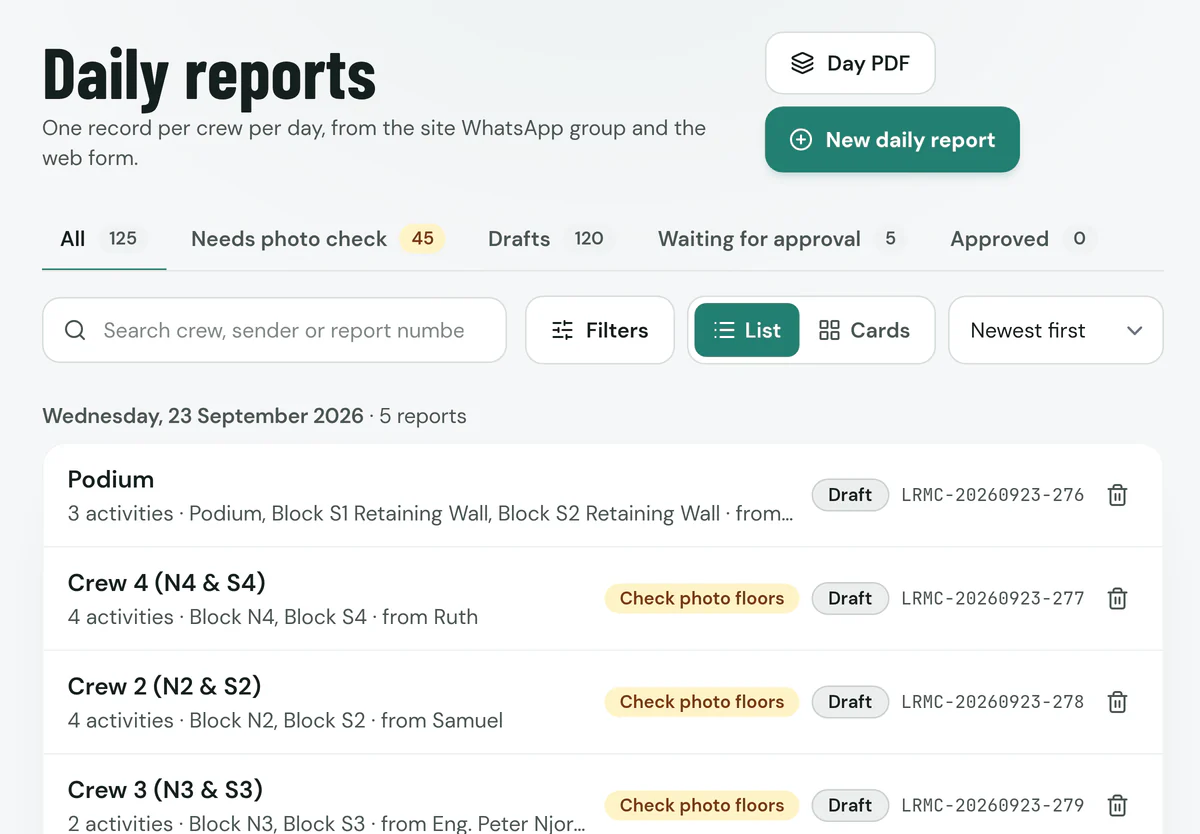
    The day's teams, towers and floors, activities, labour, weather, concerns and photos, with the source messages attached.
    Daily reports grouped by day, with each crew's activities, sender and a photo check flag
  2. Every week

    The weekly report

    Comes from
    Last week's report as the starting point, plus the week's daily records.
    Checked by
    The engineer edits and comments. Equipment, materials and photos you uploaded stay as they are until you change them.
    Goes out as
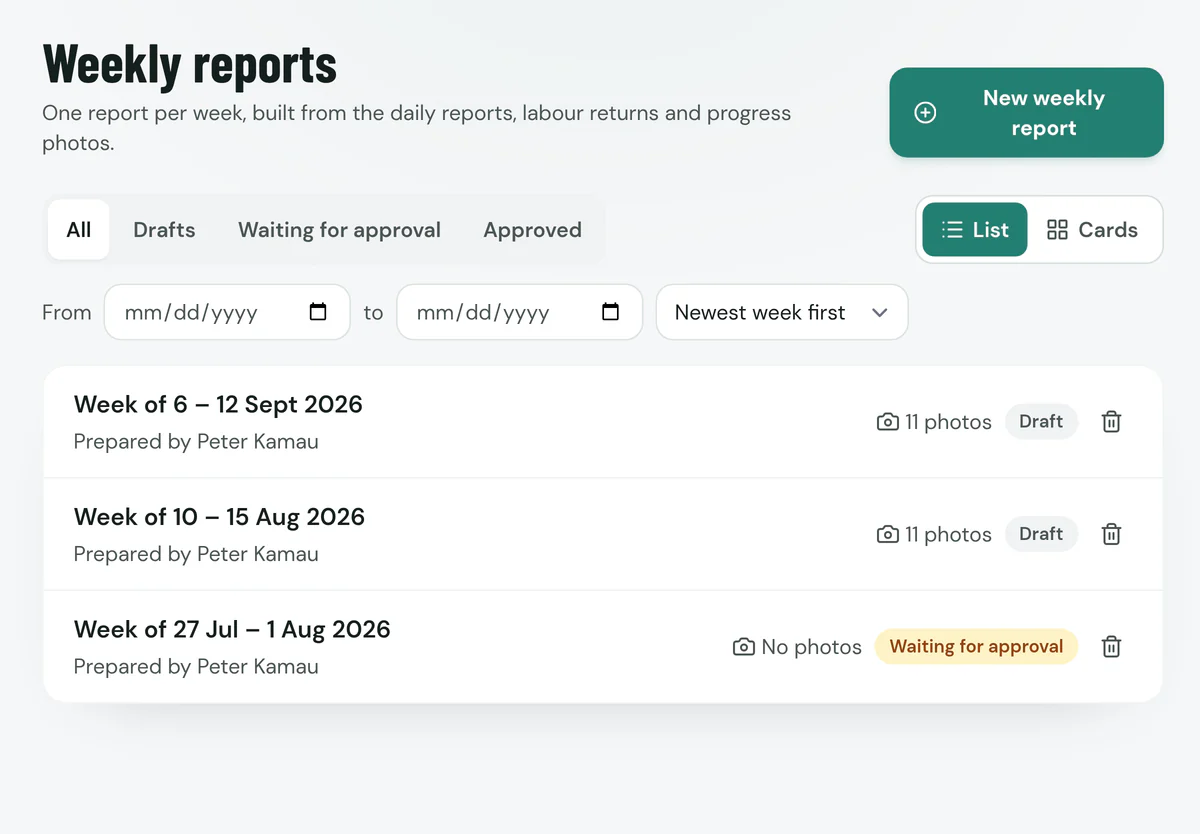
    A weekly progress report with the floor-by-floor matrix and photo pages, as a Word document or PDF.
    Weekly reports list showing each week, who prepared it, its photos and whether it is approved
  3. Every month

    The monthly report

    Comes from
    Last month's report, the month's weekly reports and the payment certificates.
    Checked by
    The project team reviews progress, time elapsed and certified amounts before an admin approves.
    Goes out as
    A monthly progress report: progress, schedule and payment position, quality and safety records, and progress photos.
    A client representative and a consultant engineer reviewing a bound monthly progress report in the site office

Each week starts from the last one.

Nobody starts a weekly report from a blank page. Carry last week's report forward, or upload it from the dashboard or by forwarding it to the WhatsApp bot, and the new week opens with its contract details, scope, matrix and photos already in place.

  • Carry forward last week's report into the new week, even after a missed week.
  • Re-aggregate to pull in the latest daily records, without losing the equipment, materials and photos you already have.
  • Download the finished report as a Word document or PDF.
  • Staff sync: daily staff rosters come in from your Google staff sheet, so head-office staff are counted without typing.
  • Working online: the weekly report also opens as a Google Doc, reviewed and commented like any shared document.
Weekly report, week ending 19 SepUploaded to start the week of 21 Sep
  • Contract details and time elapsed
  • Scope of works by day
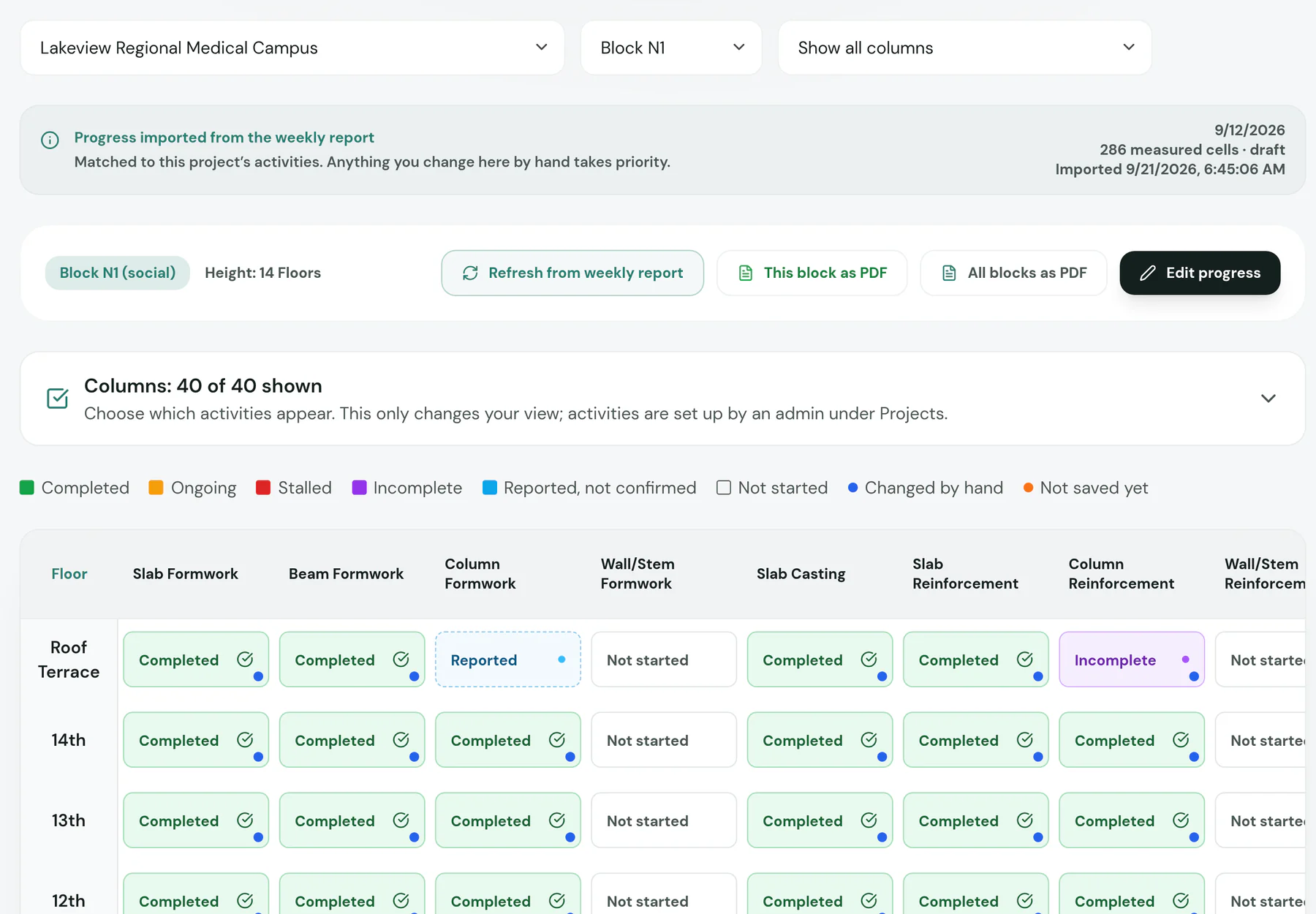
  • Floor-by-floor progress matrix
  • Labour, materials and equipment tables
  • Progress photos with captions

This week's daily records then fill in what changed on site.

Three ways in. One record.

The site WhatsApp group

JengaFlow's bot reads the project group: musters, activity updates, delivery notes and photos. It files each message under the right project, day, tower and floor, and answers with what it recorded. Forward a Word or PDF report and type /upload weekly or /upload monthly, or upload it from the dashboard, to bring it into the dashboard.


How people stay in control of the bot

The web form

Enter or correct a day's report directly, team by team, with photos.

Report upload

Upload a Word or PDF report. JengaFlow reads its tables, text and photos into an editable report.

The bot drafts. People on site decide.

Software can read a labour muster. It cannot tell which floor a photo was taken on, or whether a slab was ready to cast. JengaFlow keeps those calls with the people responsible for them.

  • Reports from WhatsApp stay drafts until someone who was on site confirms where each photo belongs.
  • Every record keeps its source message, so a figure in a report can be traced back to who sent it and when.
  • Only project admins approve daily, weekly and monthly reports.

Check where the photos were taken

Move any photo that is on the wrong block or floor, then confirm.

  • Reinforcement ready for inspection on a slabTower C · 4th floor
  • Two site staff documenting work on a floorTower C · 4th floor
  • A supervisor photographing work on siteTower D · Ground & 1st

A week on a JengaFlow site.

Nobody on site changes how they work. The records build around them, and by Friday the weekly report is waiting.

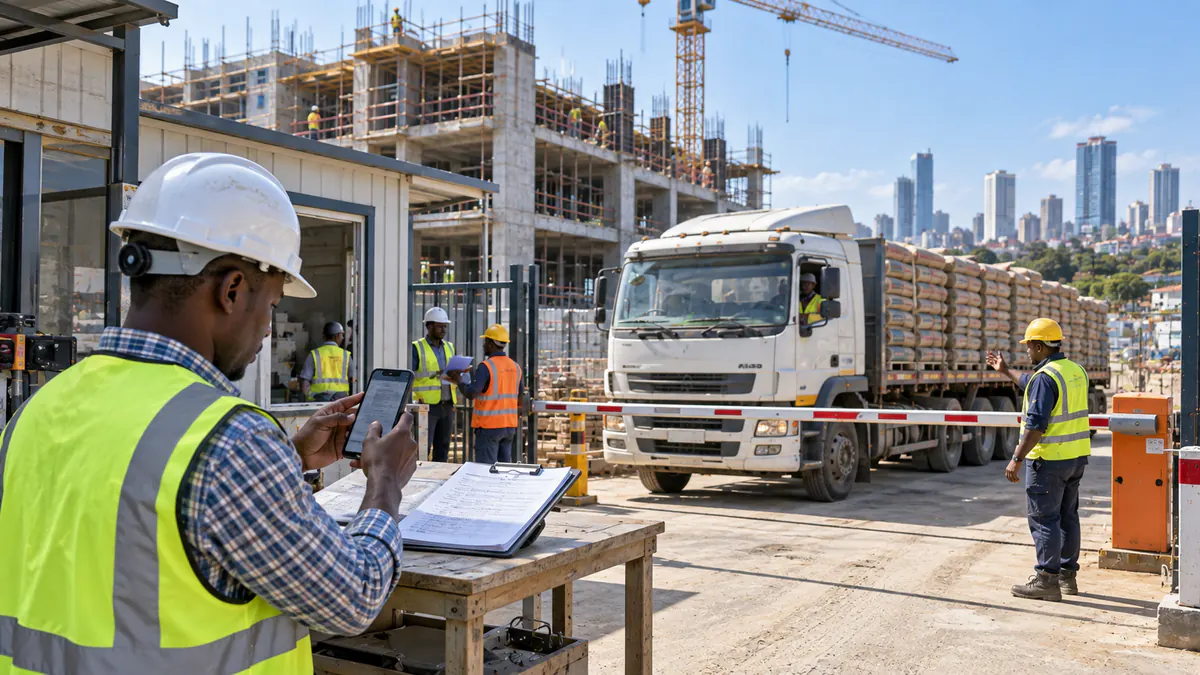
  1. A storekeeper photographing a delivery note at the site gate while a lorry of cement waits at the barrier

    At the gate

    A delivery arrives.

    The storekeeper photographs the delivery note and posts it. JengaFlow reads the supplier, items and quantities, and records what was accepted. It shows up in the week's materials table.

  2. A supervisor posting an update from his phone while the crew fixes reinforcement

    On the slab

    Each crew posts its muster.

    Headcounts and the day's plan go into the group. JengaFlow adds up labour per contractor, points out any crew that has not sent its return, and carries the totals into the weekly labour table.

  3. An engineer measuring reinforcement spacing before a slab is cast

    Before the pour

    The pour is cleared.

    Cube results from the block's earlier pours decide whether the next pour is cleared, waiting on results or blocked. The decision keeps its test evidence, ready when the client asks for it months later.

  4. A site engineer photographing marked blockwork on the fourth floor

    Evening update

    Photos land on the right floor.

    The day's report is drafted from the group with each photo placed on a tower and floor. Someone who was on site confirms the placement before it is submitted.

  5. The project team reviewing drawings and the weekly report in the site office

    Site office

    The weekly report is already written.

    Labour, activities, materials, the floor matrix and photos are already in the weekly report. The engineer reviews it, adds comments and downloads it. At month end, the monthly report builds from the weeks the same way.

Everything on site ends up in the report.

Each part of the workspace feeds the weekly and monthly reports, so nothing is typed twice.

Progress

Floor-by-floor matrix per block, updated from daily activity and imported baselines.

Labour

Daily musters per contractor and trade, site staff, gender totals and missing returns.

Materials

Orders, gate deliveries, accepted quantities, consumption and stock.

Quality

Casting readiness gates, cube tests, scaffold inspections, shop drawings and inspections.

Safety and environment

Safety reports, hazards, toolbox talks and environmental records.

Time and money

Interim payment certificates, certified and paid amounts, and time elapsed against physical progress.

Also in the workspace: finishes & defects trackerequipmentsite mapsite instructionssite minutes & action itemsconcernssubmittalsscaffold inspectionsWhatsApp broadcaststaff-sheet syncdaily & weekly PDF downloads

Floor-by-floor progress for one block, with each activity marked completed, reported or not started

Built around how Kenyan sites already work.

Block by block, floor by floor

Housing projects are tracked the way they are built: every activity, photo and progress figure sits on a block and a floor, from the daily record to the monthly matrix.

No new app to roll out

Site teams already coordinate on WhatsApp. JengaFlow works from the groups they use, so adoption does not depend on retraining a whole workforce.

Progress tied to time and money

Physical progress, time elapsed and certified payments sit next to the site evidence behind them.

Your project data stays with your project.

Each person sees the projects they are assigned to. The bot only reads groups you connect to a project. AI helps organise messages and documents; it does not approve, certify or sign anything.

Read about security, AI and WhatsApp data

From the founder

Built on site, for site teams.

Caleb Muturi

Caleb MuturiFounder & Developer, JengaFlow Pro

JengaFlow was built from firsthand experience with real construction-site workflows in Kenya: updates scattered across WhatsApp groups, the same figures typed into several forms, and hours spent turning field notes into formal weekly and monthly reports.

I built JengaFlow to fix that. It captures information where the work happens, organises it automatically, and builds the reports from it, with every figure traceable to the message or record it came from.

The goal is simple: give construction teams a clear, checked picture of their project without adding paperwork.

Common questions.

Short answers for the questions site managers ask first.

Do our site teams need to install anything?

No. Crews keep reporting in WhatsApp exactly as they do now. Supervisors and engineers use the JengaFlow dashboard in a browser on any laptop or phone.

What does the WhatsApp bot read?

Daily musters and activity updates, gate delivery notes and their photos, finishes updates from your finishes teams, and Word or PDF reports forwarded with /upload weekly or /upload monthly. Each message is filed under the right project, day, tower and floor before anything is approved.

Who approves what the bot drafts?

WhatsApp-built reports stay drafts until someone who was on site confirms where each photo belongs, and only your project administrators approve daily, weekly and monthly reports. Every record keeps the source messages it was built from.

Is our project data separated from other clients?

Yes. Each user only sees projects they are assigned to, and the bot only reads WhatsApp groups you explicitly connect to a project. Records, photos and labour figures stay inside your project workspace.

What do we receive as documents?

A PDF copy of each daily record, the weekly and monthly progress reports as Word documents and PDFs, and the weekly report also opens as a Google Doc that your project team edits together; your client receives the finished Word or PDF.

How does a new week start?

From last week. Carry the previous report forward or upload it, and the new week opens with contract details, scope and the matrix in place. The week's daily records then fill in what changed.

What happens to the WhatsApp messages we post?

Incoming messages are held in a processing queue for up to 14 days and then deleted automatically. The messages a report was built from, up to the last ten per report, stay with that report so every figure can be traced. The details are in our privacy notice and trust page.

See your next weekly report built from your own site.

In a short demo we set up a project with your blocks, connect a site group and walk through a week: daily records, labour, materials and the finished weekly report.

Joining your team's workspace? Create your account and ask your project admin for access.

Book a demo

Tell us about your project and we will call you within one working day to arrange a demo.

Give a phone number or an email, or both.