
A head start on every week
The new week opens from last week's report with contract details, scope and the progress matrix already in place, even after a missed week. The daily records then fill in what changed.
For project managers and directors
The week's report starts from last week's and fills in from the checked daily records: activities by block and floor, labour, materials, equipment and photos. Your team reviews it instead of assembling it, and the monthly report sets that progress against payment certificates and time elapsed.
In daily use on a live multi-block housing project in Kenya since September 2026.
The weekly report is where a client judges whether the job is on track. JengaFlow takes away the assembling, so your team's time goes on checking and explaining.
The new week opens from last week's report with contract details, scope and the progress matrix already in place, even after a missed week. The daily records then fill in what changed.
A floor-by-floor matrix for every block shows each activity as completed, reported or not started, updated from daily activity and the baselines you import.
The monthly report puts physical progress next to time elapsed and the interim payment certificates, certified and paid, so the questions about both get one answer.
Pull in the latest daily records at any time without losing the equipment, materials and photos already in the week's report.
How it works
Carry the previous report forward, or upload it from the dashboard. A Word or PDF report can also be forwarded to the bot with /upload weekly or /upload monthly.
Each day's checked record, from WhatsApp or the web form, feeds the week: activities by block and floor, labour, deliveries and photos.
A late correction on site? Pull the latest daily records in again; the equipment, materials and photos already in the week stay.
Your team checks the draft, on the dashboard or in the week's Google Doc, and a company admin approves the weekly report.
Both the weekly and the monthly report download as a Word document or a PDF.
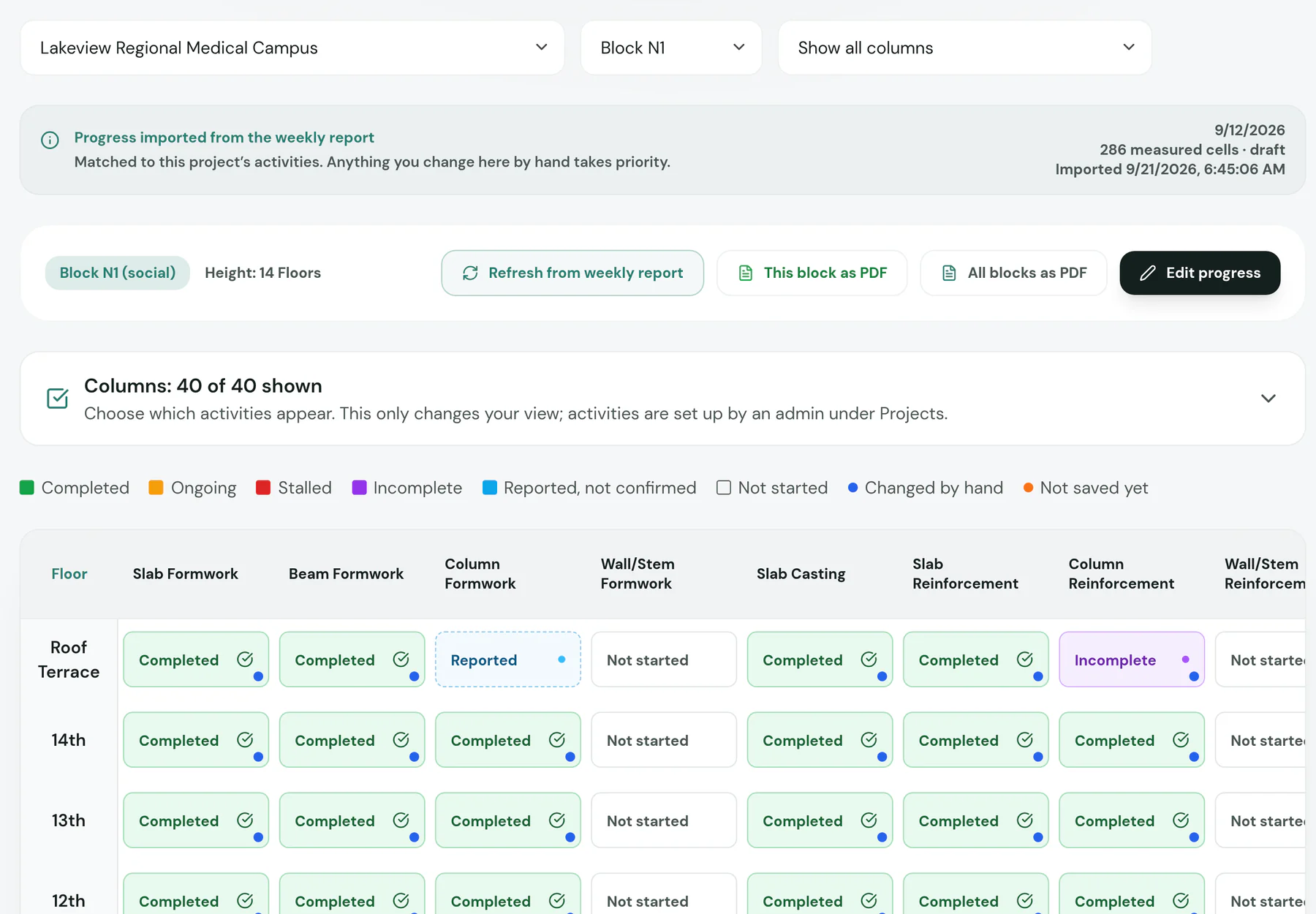

What the client or consultant sees
JengaFlow drafts; your team decides. A company admin approves each weekly report, and your team finalises the monthly report before you send it.
Short answers about weekly and monthly progress reports.
No. Upload it or forward it to the bot with /upload weekly, and the new week starts from it.
Re-aggregate the week. The latest daily records come in, and the equipment, materials and photos already in the report stay.
Yes. It sets physical progress against time elapsed and the interim payment certificates, with certified and paid amounts.
Word and PDF for both the weekly and the monthly report. The weekly report also opens as a Google Doc for your project team.

In a short demo we set up a project with your blocks, connect a site group and walk through a week: daily records, labour, materials and the finished weekly report.